Posts

Collision avoidance

Image
Hi, To avoid the robot from unexpectedly moving to unwanted positions, I created collision objects around the robot for safety measures. If a trajectory is created and it involves one of its way points to collide into the objects, the robot will not complete the trajectory and stop to the way point just before colliding. The video below showcases the robot's parts going red when colliding into the green objects. When setting a pose target, the robot will stop before colliding in both simulation and in the real-world. Video showing collision objects Immanuel
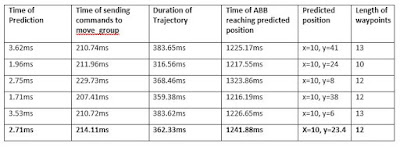
Time testing between events

Image
Hi, After playing around with the speed of the ABB, I wanted to find out what is still causing the delay between the point that the puck is moving towards the robot, trajectory prediction, the time of sending commands to the move_group node and to when the robot actually reaches that position. Below are my results from the investigation of five samplings. Testing Results As shown in the results, the robot reaches the predicted position an average of 1241.88ms after the puck is moving towards the robot. One possible cause for the initial delay of the robot's motion is having low computer performance which could slow down the process of finding a plan to perform on the robot. To remove doubt of the computer's performance, I did the same test but without running RViz as the simulator used almost 40% of the CPU. However, the results returned similar behaviour and averaged 1263.69ms from the time that the puck is moving towards the puck and the time when the robot actual...

Increasing robot's speed

Image
Hi, This week, I managed to increase the speed of the robot by switching parameters: has_velocity_limits and has_acceleration_limits to true within the joint_limits.yaml file that MoveIt! creates. The speed of the robot's joints can also be increased through this file. The image below shows the default yaml file. Default joint_limits.yaml I tested different velocity and acceleration to reduce the duration of the trajectory. I used values of 10, 15 and 20 within max_velocity and max_acceleration which reduced the duration of trajectories from 650ms with the default setting to an average of 350ms. I decided not to increase the speed further as it showed no difference in terms of successfully hitting the puck. Below are two videos to show the differences of the robot's speed from the default settings to turning off each of the joint's velocity and acceleration. Limited joint velocities & acceleration  Customised joint velocities & acceleration ...

Current Progress

Hi, This blog will be a quick rundown of my current progress with the final year project. With only a month to go left, I have to optimise my time and prioritise the main components of my project. The vision and trajectory prediction have been updated lately, therefore I don't plan on changing the methods and processes I have used until the final implementation. I decided not to use a raspberry pi as I want to have everything running on the Linux PC. In addition, I plan on not implementing the LEDs on the final setup as I believe that there is sufficient lighting in the room where the system is located. Immanuel

Comparison of IK functions

Image
Hi, In this blog, I will explain the functions that the Moveit! package provides to move the ABB to end-effector positions. Using MoveIt! KDL solver, I am able to move the robot to predicted y-coordinates given x-coordinates using my trajectory prediction algorithm. A function that I explored is compute_cartesian_path which plans a Cartesian path by specifying a list of waypoints for the end-effector to go through. Within the Moveit! package, the convention is to use metres, therefore, I chose a step size of 0.01 to move the robot between points at a resolution of 1cm. Below is a snippet of my code that implements the compute_cartesian_path function to move the robot to positions in  reference to the air-hockey table. Implementation of compute_cartesian_path function Sending trajectory commands from ROS to the robot's controller creates a small delay due to the implementation of the ABB driver of downloading trajectories instead of streaming them. It is difficult for t...

Real-time tracking and positioning

Image
Hi, In this blog, I will showcase two investigations that I have conducted to remove the doubt that my code is not the root of the delay issues that I have faced when sending trajectory commands to the robot's controller. To move the robot to the specified position I am using a function called compute_cartesian_path which computes and executes a plan of waypoints from its current pose to the target pose. The videos below illustrates a simple tracking of the puck and positions the end-effector to the y-coordinate of the puck. To avoid the robot from jittering, I appended 5 positions of the puck in a list and took the average of the list using mean and weighted average. As I am taking an average of positions, the robot may not initially exactly move to the puck's position, however, it will move there in the end. Tracking and Positioning using a mean average Tracking and Positioning using a weighted average As shown in the videos above, both investigations s...

Moving ABB by joint positions

Image
Hi, I cloned the official ROS-Industrial ABB experimental meta-package which offers various launch files to get started with the ABB IRB 120 using ROS such as connecting to the real robot. Using the moveit_planning_execution.launch provided by the package, I could connect to the real robot and run my own code. In addition, the robot's trajectory can be visualise in RViz before sending commands to the real robot. After playing around with the Moveit! Python Interface, I programmed the ABB IRB 120 by specifying a joint angle to rotate as shown in the video below. Although, I plan on only using this method at the start of the program to make the robot's tool flange parallel to the air-hockey table. Moving the ABB by joint positions If I don't specify the rotation before moving the robot to positions, the robot could possibly collide onto the table. The robot would look like the image below. Directly specifying position without making tool0 parallel to table ...